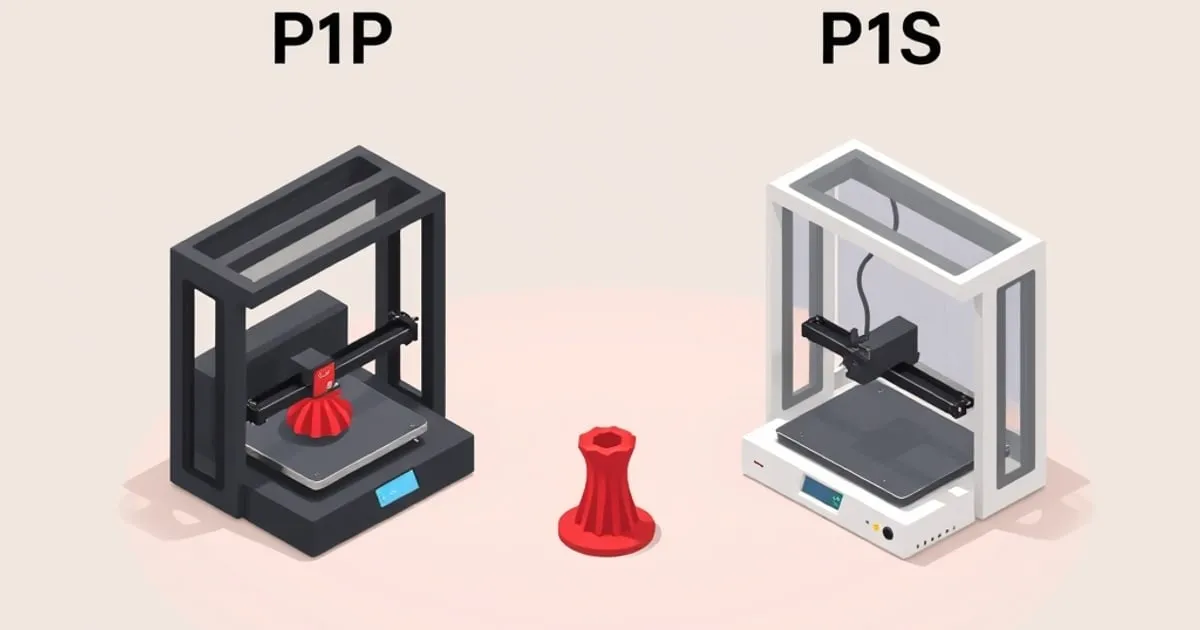
Bambu P1P vs P1S: Is the Enclosure Worth It?
The P1P and P1S share the same core. The difference is the enclosure — and whether you can add it later. Here's the honest decision framework.
The P1P and P1S are the same printer in two states of dress. They run the same CoreXY motion system, the same mainboard, the same hotend, and the same firmware. What separates them is the enclosure: the P1S ships with sealed panels and a glass door, and the P1P does not. Everything in the buying decision flows from that one difference, plus a second question most buyers miss — whether you can sensibly close in a P1P later.
Having printed on both, here is the decision framework I actually use when someone asks.
What’s Identical
Before the differences, it’s worth being clear about how much is shared, because it’s most of the machine:
- The CoreXY kinematics and the motor/belt layout.
- Bambu’s published 500 mm/s maximum print-speed rating and the same acceleration ceiling.
- The 256 × 256 × 256 mm build volume.
- The hardened-steel-capable hotend and the same nozzle system.
- Automatic calibration through vibration compensation and flow tuning.
- Full AMS compatibility, identical on both.
- The same Bambu Studio ↗ slicer and over-the-air firmware.
In side-by-side PLA and PETG prints at matched settings, I cannot tell P1P output from P1S output. The motion hardware is the same, so the print quality is the same. Anyone implying the P1S “prints better” in normal conditions is mistaken — it prints the same, but it can print harder materials reliably.
The Real Difference: The Enclosure
The enclosure does three things, in descending order of importance:
- It retains chamber heat. A passively warmed chamber (the P1S sits in a moderate range, well under the active-heating numbers Bambu quotes for the X1C) keeps ABS and ASA from contracting and lifting mid-print. This is the headline reason the enclosure exists.
- It blocks drafts. Even with PLA, a cold cross-breeze from a window or HVAC vent can cause uneven cooling and layer issues on tall thin parts. The P1S removes that variable entirely.
- It contains fumes and noise. ABS and ASA emit styrene; the P1S keeps that inside until you choose to vent it, and the panels noticeably dampen running noise.
The P1P has none of this. Open-frame, it is functionally an A1-class material profile (PLA, PETG, TPU) in a CoreXY body.
Can You Enclose a P1P Later?
This is the question that changes the math. The P1P was designed to be upgradeable — Bambu sells an official enclosure kit, and there is a large ecosystem of printed panel mounts. So the honest framing is not “P1P forever vs P1S,” it’s:
- Buy the P1S if you already know ABS/ASA is in your future. The factory enclosure is better integrated than most retrofits, and you avoid an afternoon of assembly.
- Buy the P1P if you are PLA/PETG-focused now but want the option open. You keep the CoreXY core and can add the official enclosure kit when a project actually needs it. The combined cost typically lands close to a P1S, so you are paying for flexibility and timing, not saving much money long term.
- Buy the P1P and stay open only if you are confident you will never need engineering materials. Then the enclosure is dead weight.
The mistake to avoid is buying a P1P to “save money” while planning to print ABS — you will spend the difference on the kit and the time.
Where Each One Wins
The P1S is the better default. For most buyers who want one machine that handles the widest material range with the least fuss, the factory enclosure removes a whole category of failure modes. If you are choosing between them with no strong reason either way, this is the safe pick.
The P1P wins for the modder. The open frame is genuinely easier to work on — better access to the toolhead, the gantry, and wiring. If you enjoy tinkering, plan a custom enclosure, or want to experiment with the mods that are actually worth doing, the P1P is the more pleasant base.
How They Sit Against the Rest of the Lineup
The P1 pair sits between the A1 series and the X1 Carbon. Compared to the A1 and A1 mini, the P1S adds true enclosed ABS/ASA capability and a CoreXY frame. Compared to the X1 Carbon, the P1S gives up the Micro Lidar first-layer system, the AI camera, and active chamber heating — see our P1S vs X1 Carbon comparison for whether those are worth the step up.
For multicolor work, both the P1P and P1S take the same AMS, and the workflow is identical — our AMS multicolor guide applies to both without modification.
My Recommendation
Pick the P1S unless you have a specific reason to want an open frame. The enclosure solves real problems — material range, draft sensitivity, fumes, noise — and the price gap is modest relative to what it unlocks.
Choose the P1P if you are a tinkerer who wants the cheapest route into the CoreXY ecosystem and either don’t need an enclosure or want to build/add one on your own terms. It is the same printer underneath; you are buying a different relationship with the machine, not different print quality.
Either way, you are getting Bambu’s CoreXY platform, which remains the strongest reason to choose this lineup over a budget open-frame printer. For where these machines land against Prusa and Creality, see our Bambu vs Prusa vs Creality breakdown. For broader cross-brand context, FDM Desk’s buyer guide covers all tiers ↗.
Related

Bambu P1S vs X1 Carbon: Which Should You Buy?
A direct comparison of the Bambu P1S and X1 Carbon — what's actually different, what's the same, and which one makes sense for your use case.
Bambu vs Prusa vs Creality: How to Decide
Three philosophies, not just three brands. An honest decision framework for choosing between Bambu Lab, Prusa, and Creality in 2026.
Bambu A1 vs A1 Mini: Which Bed-Slinger Wins?
The A1 and A1 mini share Bambu's bed-slinger DNA but differ in build volume, footprint, and price. Here's how to pick the right one.